AI online exam software is a category of assessment tools that delivers tests over the web and uses automation to handle scheduling, grading, item analysis, and exam monitoring. The goal is simple: run secure, fair assessments at scale without a room full of invigilators. ICTLMS fits this category as a Moodle-based assessment cloud built for schools and training teams.
If you’ve ever tried to run a 500-student exam on a tool built for 30, you already know where the pain lives. Servers wobble. Honesty gets hard to verify. Grading drags on for days. So the real question isn’t whether to move exams online. It’s how to do it without trading away security or your weekends.
This guide walks through what AI online exam software actually does, where the AI part helps (and where it’s still maturing), what to check before you buy, and how the ICTLMS assessment cloud is set up for exam delivery today.
What AI online exam software actually does
At its core, this software replaces the paper-and-room model with a browser-based exam flow. Candidates log in, get served questions, answer within a time window, and submit. Behind that flow sits the part that earns the “AI” label: pattern detection, automated grading of structured items, and analytics that flag odd behavior across a cohort.
Most platforms in this space cover four jobs. First, authoring: building question banks with multiple choice, short answer, essay, and file-upload items. Second, delivery: scheduling, randomized question order, and time limits. Third, monitoring: keeping the exam honest, which is where proctoring lives. Fourth, scoring and reporting: auto-grading what can be auto-graded and surfacing results in a way a human can act on.
Here’s my honest take. The grading and analytics layers are mature and genuinely save time. The “AI proctoring” layer is where vendors oversell. A flagged-behavior model is a helper, not a verdict, and any team treating it as a verdict is asking for an unfair dispute. Good software keeps a human in the loop. Treat that as a buying requirement, not a nice-to-have.
Online exam software with proctoring: how monitoring works
Proctoring is the trust layer. When you can’t see the candidate, you need other signals that the exam was taken fairly. There are three common approaches, and the right one depends on your stakes.
Live proctoring puts a human invigilator on a video feed, watching candidates in real time. It’s the strictest model and the most expensive, and it doesn’t scale past a few hundred concurrent sessions without a large staff. Record-and-review captures video and screen activity, then lets a reviewer scrub flagged moments afterward. Automated proctoring uses software signals like tab-switching, multiple-face detection, or sudden audio to raise flags. Many teams blend automated flagging with a human review pass, which keeps cost down while protecting against false accusations.
One thing worth saying plainly: heavy proctoring carries privacy and accessibility trade-offs. Some candidates can’t use webcams. Some find constant monitoring stressful enough to hurt performance. For low-stakes quizzes, lighter controls like randomized question pools and tight time windows often do the job without the surveillance overhead. Match the control to the risk.
A practical example: a vocational training provider running weekly skills checks doesn’t need live video on every quiz. Randomized banks plus a locked browser window handle 90% of the integrity risk. Save the heavier proctoring for the final certification exam, where the stakes justify it.
Where the AI assessment platform layer adds real value
Strip away the marketing and an AI assessment platform earns its keep in a few concrete places.
Auto-grading is the obvious win. Multiple choice and numeric items grade instantly, and that alone can cut a grading backlog from days to minutes. Smarter systems also score short-answer responses against a rubric, though I’d argue you should always sample-check those by hand until you trust the model on your specific question style.
Item analysis is the underrated win. After an exam runs, the platform can tell you which questions everyone got right (too easy), which ones split the strong and weak candidates cleanly (good discriminators), and which ones confused even your top performers (probably badly worded). That feedback loop makes your next exam better. Most teams ignore this data, and they shouldn’t.
Then there’s scale. A well-built assessment cloud can absorb a spike of thousands of candidates hitting submit at once without the server falling over. That’s an architecture problem, not really an AI one, but it’s the difference between a calm exam day and a support fire. When you evaluate vendors, ask about concurrent-user limits specifically.
Choosing AI online exam software: what to check
Buying decisions in this space go wrong in predictable ways. A few checks save you from most of them.
- Concurrency, not just total users. A platform that supports 10,000 accounts but chokes at 800 simultaneous submissions is useless for a real exam window.
- Question variety. If you only get multiple choice, you’ll outgrow it fast. Look for essay, file upload, and structured-response support.
- Human-in-the-loop proctoring. Automated flags should route to a reviewer, never auto-fail a candidate.
- Standards support. If you run other learning tools, LTI 1.3 lets your exam platform plug into them cleanly instead of living on an island.
- Data ownership and customization. Open standards and source access matter when you need to rebrand, integrate, or audit how scoring works.
That last point is where open source platforms pull ahead. When you can see and modify the code, you’re not stuck waiting on a vendor’s roadmap to fix a workflow that doesn’t fit your school. For a deeper look at the trade-offs, our guide on how to choose a cloud LMS and the features it must have covers the evaluation checklist in more detail.
How ICTLMS approaches online exams and assessment
ICTLMS is built on Moodle, the most widely used open source learning platform, and positioned as an assessment cloud for schools, academies, colleges, and training teams. That foundation matters: it means the exam and quiz engine you’re getting is battle-tested across millions of courses, and the source is open for rebranding and customization.
On the assessment side, the platform handles online marking of papers, assignments, and quizzes, with a question repository teams can reuse across courses. Course administrators and faculty control who can access which exams, so only enrolled candidates sit a given test. Analytics track candidate performance across the system, which feeds the item-analysis loop described above. You can read the full breakdown on the ICTLMS features page.
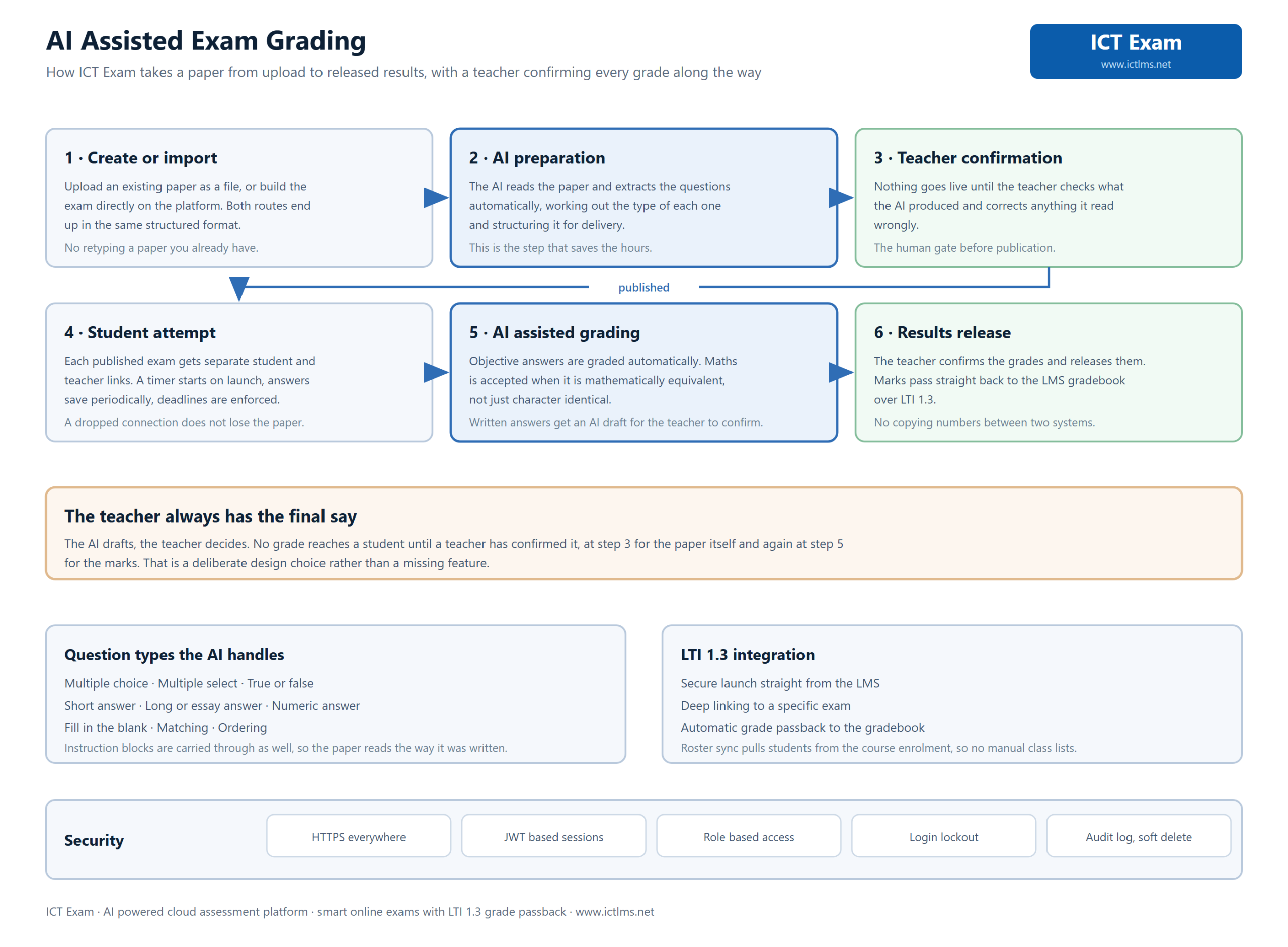
Because it’s standards-friendly, ICTLMS supports an LTI 1.3 exam flow, so assessments can connect into a broader learning stack rather than forcing everything into one tool. Multilingual support, mobile apps, and live web conferencing round out the platform for teams that run blended programs, not just exams. For the bigger picture on why cloud delivery matters here, see our piece on cloud learning management systems.
A note on AI proctoring specifically, because feature accuracy matters more than hype: advanced AI proctoring and AI-driven exam monitoring are on the ICTLMS roadmap and coming soon, not features I’d tell you to deploy today. What’s live now is a solid, scalable assessment and quizzing engine with role-based access and analytics. If automated webcam proctoring is a hard requirement for your certification program right now, plan around the human-reviewed model and watch the roadmap.
Frequently asked questions
What is AI online exam software?
It’s web-based assessment software that delivers exams through a browser and uses automation to schedule tests, auto-grade structured items, analyze question quality, and flag possible integrity issues. The AI layer assists humans; it doesn’t replace a reviewer’s judgment on high-stakes decisions.
Does online exam software with proctoring stop all cheating?
No tool stops everything, and any vendor claiming otherwise is overselling. Proctoring raises the cost and risk of cheating through monitoring, randomized question pools, and locked browsers. For high-stakes exams, blend automated flagging with a human review pass for fairness.
Is an AI assessment platform worth it for small training teams?
Often yes, mostly because of auto-grading and reusable question banks. Even a small team running weekly skills checks saves real hours when multiple choice grades itself and exams can be cloned. Start with lighter integrity controls and add proctoring only where the stakes call for it.
Does ICTLMS support live AI proctoring today?
Advanced AI proctoring is on the roadmap and coming soon. What ships today is a Moodle-based assessment cloud with online quizzing and marking, role-based exam access, performance analytics, and an LTI 1.3 exam flow. Plan certification programs around human-reviewed integrity controls for now.
How does scalability work for large online exams?
Scalability comes from the platform’s architecture, specifically how many candidates it can serve at the same moment. Ask vendors about concurrent-user limits, not just total accounts. A cloud-hosted assessment platform should absorb a spike of simultaneous submissions without slowing down or dropping sessions.
Bringing it together
AI online exam software solves a real problem: running secure, fair assessments at a scale that manual invigilation can’t match. The grading and analytics layers deliver value today. AI proctoring is genuinely useful but still maturing, so keep a human in the loop and match your integrity controls to the actual stakes of each exam.
ICTLMS gives you an open source, Moodle-based assessment cloud with a real quizzing engine, role-based access, analytics, and an LTI 1.3 exam flow now, with AI proctoring on the way. If that fits how your team runs exams, take a closer look at the features or reach out through the Contact Us page to talk through your setup.