ICT Exam is now connected to ICTERP. Your ERP sends classes, subjects and students to the smart online exam, hands each student a signed exam link, and gets the finished mark back on its own. In our live test on 2 November 2026, the mark reached ICTERP about one second after the student pressed submit.
If you run a school, college or university on ICTERP, that means no more exporting a results sheet from one system and typing it into another. The exam lives in ICT Exam. The record lives in ICTERP. The two now keep each other up to date.
What’s live today
Both halves are in production. The integration API on the ICT Exam side went live on 27 October. The matching ICTERP connector, part of ICTERP’s education solution, has been running on ICTERP since 26 October. On 2 November we ran a full round trip on the live systems, from a synced class to a written mark, and the mark came through without a single retry.
Here’s what the connection covers:
- ICTERP sends its classes (batches) and subjects to ICT Exam, and, if you switch it on, its students and teachers too.
- Every record carries a stable reference from ICTERP, so renaming a class or fixing a typo in a student’s name doesn’t break the link between the two systems.
- Each exam or assessment in ICTERP is tied to a paper in ICT Exam.
- Students get a signed link to sit the paper. They don’t need a separate ICT Exam login.
- When an attempt is fully graded, ICT Exam tells ICTERP, and ICTERP writes the mark against the right student.
How a smart online exam result travels back to ICTERP
The split of responsibilities is simple, and we think it’s the right one. ICTERP stays in charge of people, classes and the official mark book. ICT Exam stays in charge of papers, attempts and grading. Neither system tries to do the other’s job.
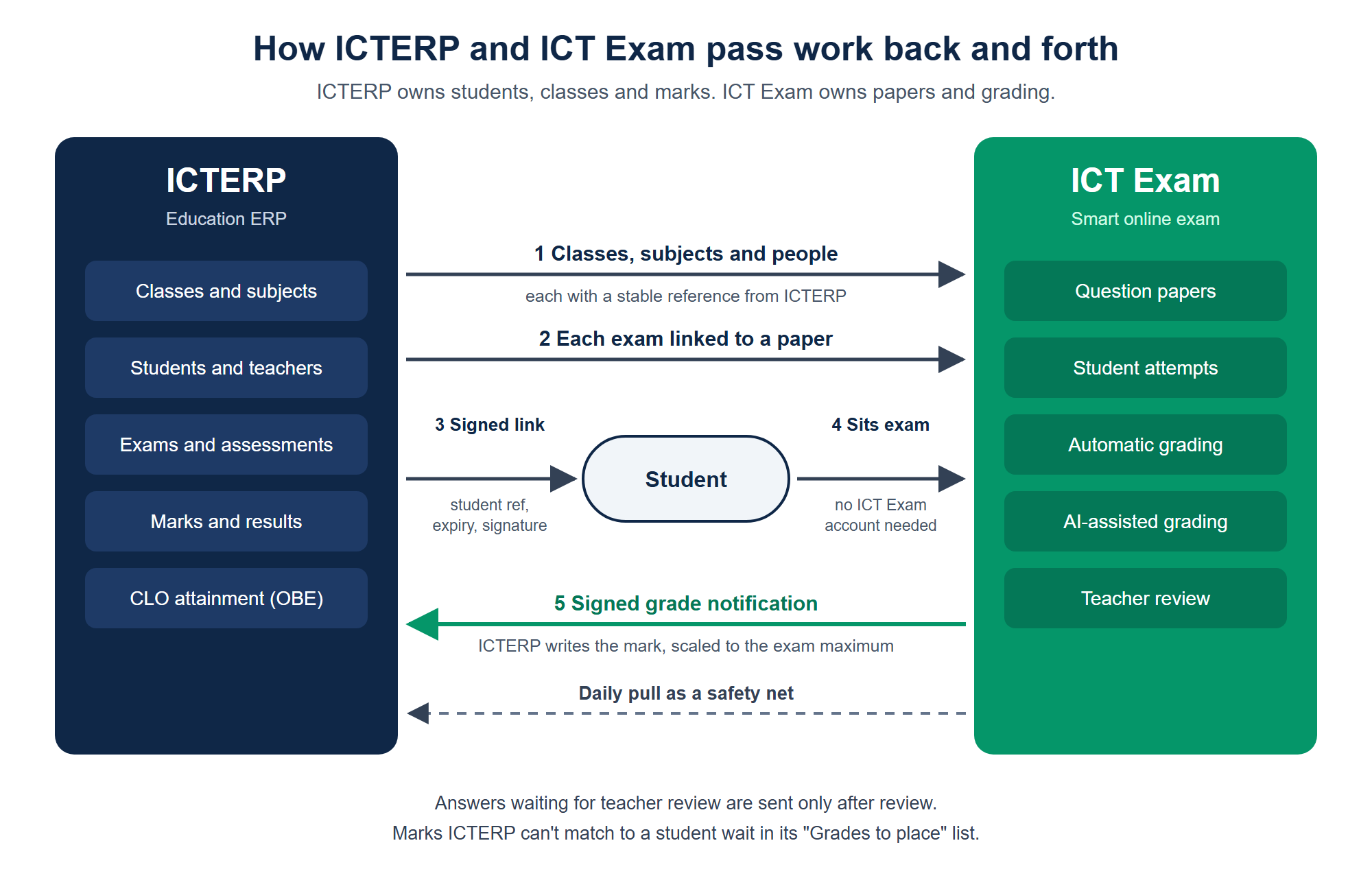
ICTERP owns the people and the marks; ICT Exam owns the papers and the grading.
The student’s link is where most of the care went. It carries the student’s ICTERP reference and an expiry time, and the whole thing is signed with a shared secret. ICT Exam checks that signature before it lets anyone in, so a student can’t edit the link to sit the paper as someone else, and an old link stops working once it expires. You choose how long links stay valid, up to 90 days. Staff can open a window of links for a whole exam in ICTERP and email each student their own with one click.
The return trip is signed too. When ICT Exam finishes grading an attempt, it sends ICTERP a grade notification that ICTERP verifies before it touches a mark. If ICTERP happens to be unreachable at that moment, ICT Exam tries again later.
What happens to each mark
A connector is only as good as its edge cases. Here’s how this one handles them.
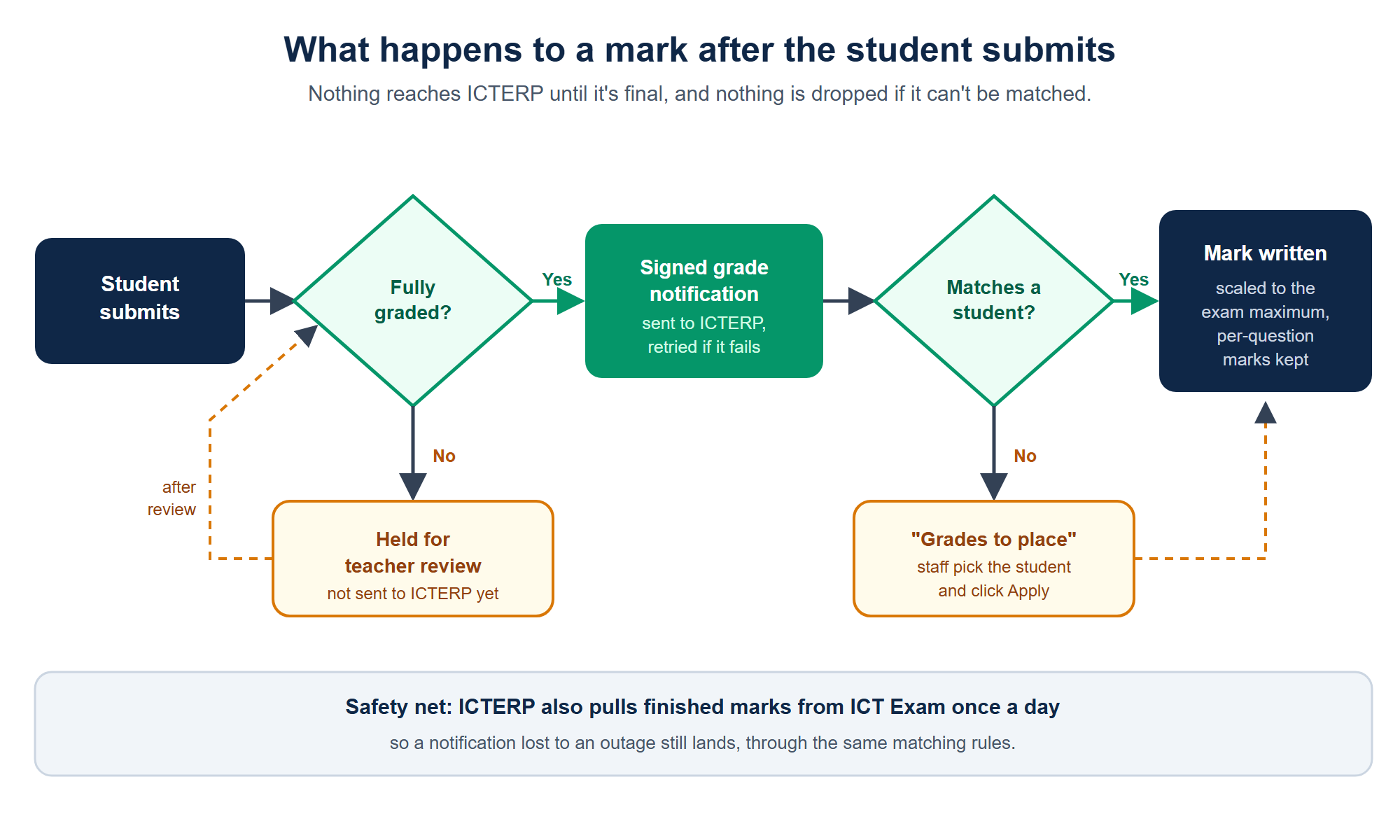
Nothing reaches ICTERP until it’s final, and nothing is lost if it can’t be matched.
Marks are scaled to your exam. If the ICT Exam paper is out of 6 and the ICTERP exam is out of 100, a 3 arrives as 50. You don’t have to build papers with the same total as your mark book.
Teacher review comes first. ICT Exam grades objective questions on its own and uses AI-assisted grading for written answers, with teachers able to review and override. If any answer in an attempt is still waiting for a teacher, nothing is pushed. The mark goes across once the review is done, so ICTERP never shows a half-finished score.
Per-question marks come along. Alongside the total, ICT Exam can share the mark for each question. On an ICTERP course assessment whose questions match the paper’s, those marks go onto each question, and from there into outcome-based education, so attainment against each course learning outcome (CLO) builds up without anyone re-entering marks.
Unmatched marks wait for a person. ICTERP matches each mark to a student by the reference in their link. If it ever can’t be sure, the mark lands in a “Grades to place” list where a staff member picks the student and clicks Apply. It isn’t guessed and it isn’t dropped.
A daily pull backs everything up. ICTERP also collects finished marks from ICT Exam once a day. If a notification ever goes missing, the mark still arrives the next time that runs, through the same matching rules.
The 2 November test, in numbers
We didn’t want to announce this off a diagram. So we set up a class in ICTERP, synced it, linked an exam to a short objective paper in ICT Exam and sent a student their signed link.
The student submitted at 08:34:27 UTC. About one second later the mark was sitting in ICTERP, scaled correctly and recorded against the right student. Zero retries. Nothing in the unmatched list. We then triggered the daily pull by hand, and it fetched the same result with its per-question marks and left the mark exactly where it was, which is what you want from a safety net.
One second won’t matter much on a quiz day. It matters when a term’s worth of exams closes in the same week and nobody has to sit with a spreadsheet afterwards.
Who should switch it on
If you already use ICTERP for admissions, timetables and results, this is the obvious next step. You can write papers, or upload existing ones, in ICT Exam, let it handle the marking, and keep ICTERP as your single source of truth. The full list of question types and grading options is on the ICT Exam features page.
If your school runs Moodle instead, ICT Exam’s LTI 1.3 route hasn’t changed; our integrations page covers both paths. And if you’re still choosing an ERP, have a look at ICTERP’s education solution, built on Odoo Community, which this connector is part of.
Setup happens on both sides. In ICT Exam you create an API key and the two shared secrets. In ICTERP you enter them under the education settings and decide which classes and people to sync. Plans for ICT Exam are on the packages page.
FAQ
Do students need an ICT Exam account?
No. They open the signed link ICTERP gives them and sit the paper. The link itself proves who they are, and it expires on the date you set.
How quickly do marks show up in ICTERP?
For papers that grade automatically, in about a second. In our live test the gap between submit and a written mark was roughly one second. If a teacher still has answers to review, the mark arrives as soon as they finish.
What if a mark doesn’t match any student?
It goes into the “Grades to place” list in ICTERP. Someone picks the right student, clicks Apply, and the link is remembered for next time.
Does ICTERP get the score for each question?
Yes. Per-question marks come with every result. On course assessments set up with matching questions, they also count toward CLO attainment for outcome-based education.
How do we get started?
You’ll need ICTERP with its education solution and an ICT Exam account. Contact us and we’ll help you connect the two.